How to send automated marketing emails to employers with WP Job Manager Read More »
The post How to send automated marketing emails to employers with WP Job Manager appeared first on wpfred.com.
]]>Here’s s a few ways how to achieve this.
1. Using WP Job Manager’s integrated notification for expiring job listings
If you go to Job Listings > Settings > Email Notifications you will see an option to send an email to the employer before their job listing expires. You can specify the number of days before expiry that the email should be sent.
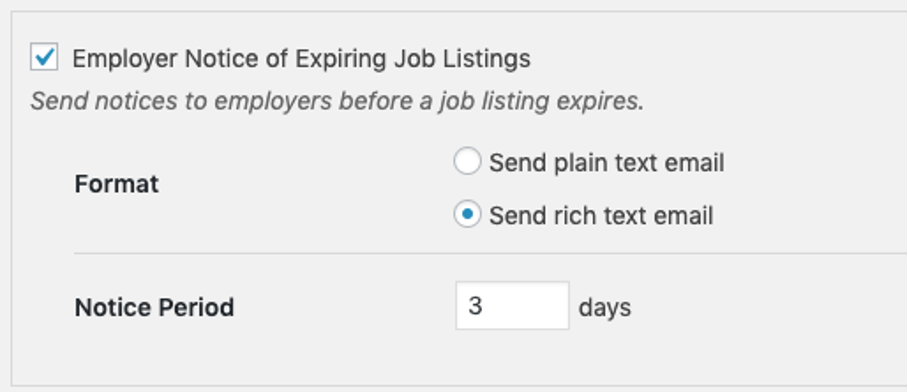
You will see that there is no option to change the content or even see what that email looks like. If you do want to change the text then you need to either
- copy the file /wp-content/plugins/wp-job-manager/templates/emails/employer-expiring-job.php to your child theme folder to override the file. You can just change the text strings or add HTML to the template file itself OR
- edit the language files or use a translation plugin such as Loco Translate or WPML to change the text strings.
Result: As you can see the settings are very limited but if you don’t want to spend any extra money and prefer to stick with the free core version of WP Job Manager then this is a useful feature which can be enabled with one click. I personally think though that if you want to increase revenue for your job board you should definitely use more sophisticated email features.
2. Post Status Notifier
This free plugin is not specifically designed for WP Job Manager since it can be used for any posts, pages or custom post types such as events or job_listings. It uses the post status functionality from WordPress to send emails. For example if a job has been approved by the admin the post status changes from pending to published. So you can create an automated email notifying the employer that their job listing has been approved. Another example would be to send an email to the WordPress admin if a new job has been submitted. This way you don’t have to manually check for new job listings all the time.
One interesting feature in the Premium version ist the Mail queue which you can use to delay the email instead of sending it right away.
Result: Since WP Job Manager does not have any of these emails integrated it does make sense to use a free plugin like Post Status Notifier. But you can see that again you have very limited options because by nature you can only use the post status as a trigger.
Download Post Status Notifier
3. WP Job Manager Emails
This is a paid plugin written by Myles from sMyles Plugins. Myles is known for some of the best WP Job Manager plugins you will find out there and WP Job Manager Emails is definitely one of them. This plugin has dozens of job or user related shortcodes which you can insert in your email template, a very intuitive UI and even the possibility to add if/else statements with a simple shortcode, you really do not need to know how to code for this. It’s amazing how many features this plugin has, especially if you are using some of the Paid Add-Ons such as Job Alerts, Resume Manager or Applications. Just check out the WP Job Manager Emails documentation page and you will see how many features there are.
But if you are looking to increase revenue by sending out marketing emails it will unfortunately not be sufficient. WP Job Manager Emails relies on triggers which are again only related to the post status.
Download WP Job Manager Emails
What you cannot do with Post Status Notifier nor with WP Job Manager Emails is to send emails based on orders or users like for example “send an email with an automatically generated coupon code to every user who has spent at least 200 USD in the last 30 days”.
By the way: WP Job Manager covers this topic on their documentation page for Email Notifications and also recommends the same two plugins WP Job Manager Emails and Post Status Notifier but you’ll find much more details and practical tipps in this article.
4. Using WC Paid Listings and WooCommerce to transform your job board into an e-commerce platform
If you are charging employers for job listings you probably already came across the paid add-on WC Paid Listings. Together with WooCommerce it transforms your little job board into an e-commerce monster. I definitely recommend using WP Job Manager + WC Paid Listings + WooCommerce because it opens up a whole new world of plugins and 3rd-party tools.
4.1. Why you should install WC Paid Listings
WC Paid Listings is actually a pretty simple plugin which gives you some key features:
- It adds a custom product type to WooCommerce called “Job Packages”. You can create as many different job packages as you like and choose price, job listing duration and other options.
- You can sell bundled job packages where an employer can buy multiple job packages at once. You can add, edit and delete job packages in the backend.
WC Paid Listings is great but it needs some customization to enhance its features. That's why I wrote a little plugin which allows you to create a pricing page and insert some custom booking buttons. This should boost your sales even more. Check out Better Pricing for WC Paid Listings.
4.2. How to use WooCommerce for email marketing
With WooCommerce you can basically do anything you want and in many cases you do not need to write code or hire a developer. As a marketer you can simply use plugins or 3rd-party services for your email marketing. Here are some examples:
- Mailpoet
Mailpoet is the official plugin by WooCommerce to create beautiful emails and target your customers. They describe it best like this: “Personalize your follow-up emails according to whether they’re a new customer, the exact product they purchased, or by the product’s category. Then schedule your emails to be automatically sent immediately or X days/weeks following purchase.“ - Mailchimp
If you are already using Mailchimp for your newsletter then you might want to connect it to your WP Job Manager job board using the Mailchimp for WooCommerce plugin. It lets you create follow up emails post-purchase and track and segment your customers based on purchase history and purchase frequency. - Zapier
Use Zapier to connect your WooCommerce data with thousands of cloud-based services like Hubspot, Salesforce, Mailchimp, Gmail and many more.
5. Use metorik.com to analyze your WooCommerce and send automated emails to your customers
Some years ago, before WooCommerce launched its built-in Reports dashboard, it was pretty difficult to get a good overview on your store’s performance and to see which are your top-selling products and who are your best customers. This is why Metorik is such a great tool and I recommend it to anyone running a WooCommerce store. I was able to increase my job board’s revenue by approximately 30% by creating around 20 automated marketing email campaigns. But even more importantly I really started to understand my business better.
5.1. What is Metorik and how does it work?
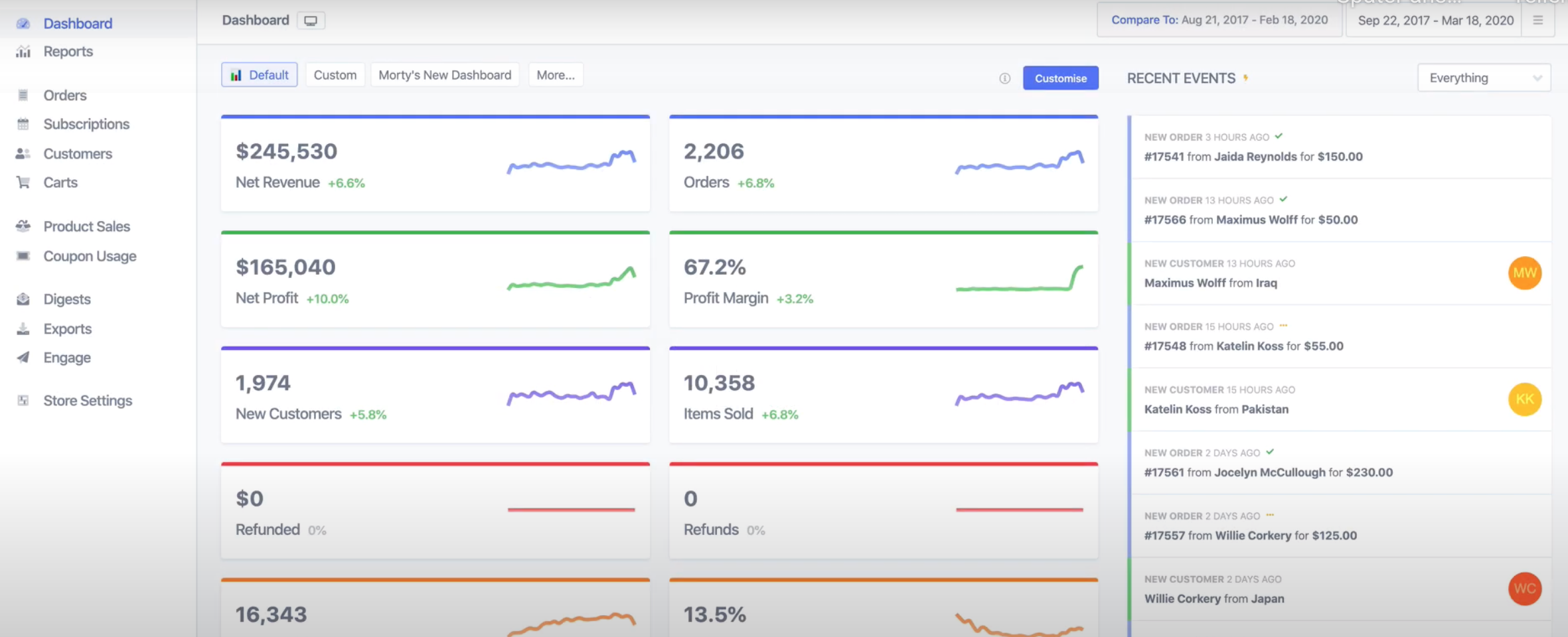
“In just a few clicks, Metorik gives your store a powerful real-time dashboard, unifying your store’s orders, customers, subscriptions, and products, helping you understand your data and make more informed decisions every day.”
After you register at metorik.com you need to install and activate their plugin. The setup really only takes a few minutes and what you get is your WooCommerce store data in a beautiful dashboard with hundreds of KPIs, filters and options to choose from.
5.2. How can I send automated emails to my WooCommerce customers?
Metorik has a feature called “Engage” which lets you send emails to your customers based on any criteria you want to choose from. There are two types of Engage campaigns that can be sent – based on orders or customers. What is the difference?
- Order-based campaigns are based on a specific order a customer has made. Example: Send an email to a customer 2 days after they purchased product X inviting them to leave a review on trustpilot.com.
- Customer-based campaigns are based on specific criteria you define for a segment of customers. Example: You created a customer segment called “VIP customers” which contains all customers who have made at least 5 orders in the past 12 months. You can now create an automated email to any customer once they fulfill these criteria.
5.3. What email campaigns should I create for my job board?
The great thing about Metorik is that it gives you plenty of tools to analyze and understand your business better. Once you did that it is much easier for you to focus on your most important products and customers and create efficient email campaigns. Here are some examples of email campaigns I have setup with Metorik in the past:
- Send a reminder to the employer 5 days before their job listing expires asking them if they want to renew the listing at a discounted price.
- Send a 5 % coupon for my product “Job Package X” to any new employer one day after registration. You don’t have to create the coupon in WooCommerce first, you can do that right within Metorik in the email campaign editor. With each email Metorik will automatically create a unique coupon code.
- Send an invitation to my customers for a Trustpilot review 3 days after purchasing a job package.
As you can see you can get very creative here and Metorik really makes it easy for you because it is fast, intuitive and has tons of useful features and pre-built templates to choose from. You can even see some basic stats like open rate and conversion rates which lets you see how your email campaings are performing.
The post How to send automated marketing emails to employers with WP Job Manager appeared first on wpfred.com.
]]>The post Demo for “Better Pricing for WC Paid Listings” is out appeared first on wpfred.com.
]]>The post Demo for “Better Pricing for WC Paid Listings” is out appeared first on wpfred.com.
]]>The post New plugin Better Pricing for WC Paid Listings published appeared first on wpfred.com.
]]>The post New plugin Better Pricing for WC Paid Listings published appeared first on wpfred.com.
]]>Plugin Description: Better Pricing for WC Paid Listings Read More »
The post Plugin Description: Better Pricing for WC Paid Listings appeared first on wpfred.com.
]]>What does the plugin do?
It creates a shortcode [job_package_button] which you can add to your custom pricing page or on any other page or post on your site. You must use the shortcode parameter “id” (= product_id) to specify which product you are referring to. The <button> then redirects your customer to step 2 of the job submission form skipping the “Choose a Package” screen provided by WC Paid Listings. By adding the product id as a parameter in the shortcode the product is already selected in the background.
Why is this plugin helpful?
WC Paid Listings is a great little plugin that adds a custom “Job Product” to WooCommerce and helps you and your customers manage their job packages easily. But it comes with a very limited frontend pricing template called “Choose a Package”. There are no styling options and you cannot change the order of the products (default is order by product_id which does not make much sense). Every E-Commerce business needs a beautiful pricing page where all your products, features and prices are displayed. You can do that now with this simple plugin.
What other plugins are required for this plugin to work?
This plugin adds functionality to the paid plugin WC Paid Listings which can only be used together with WP Job Manager and WooCommerce.
How do I create my own pricing page for WC Paid Listings?
You can insert this shortcode on any post or page created on your site. There are plenty of pricing templates out there for Gutenberg, Elementor, Visual COmposer or any other page builder. You can also use WooCommerce’s Gutenberg blocks to display your products but instead of the “Add to Cart” button you can add a “Book a listing now” button that redirects to the job submission form.
How do I use the shortcode [job_package_button]?
- Make sure you have installed and activated the three plugins WP Job Manager, WooCommerce and WC Paid Listings.
- Go to Jobs => Settings => “Job Submission” and select “Choose a package BEFORE entering job details”. Otherwise the shortcode does not work properly.
- Create some products and choose “Job Package” as product type.
- Create a pricing page where you describe your job package product and add the shortcode. A “Book a listing now” button will appear which redirects your customers to step 2 of the job submission form with the respective job package pre-selected. You can add as many shortcodes on a single post or page as you like.
What options does the shortcode have?
- ‘id’ (=product_id). Example: [job_package_button id=”35″]. You must add an ID for the shortcode to work otherwise you will get a “Invalid package” error message when clicking the button.
- ‘text’ = The text displayed on the button. Default is “Book a job now”. Example [job_package_button id=”35″ text=”Book a Premium job listing now”].
- ‘url’ = The slug of your job submission page. Per default WP Job Manager creates a page /post-a-job. Only use this if you create a job submission page with a different slug. Example: [job_package_button id=”35″ url=”/create-job-listing”]
- ‘button_class’ = CSS class for the
<button>. If you don’t add a custom class here it will use your theme’s default styling for buttons. Add your custom CSS to your child theme’s style.css or use the Customizer. [job_package_button id=”35″ class=”pricing-buttons”]. - ‘div_class’ = Add a custom CSS class to the outer div wrapped around the
<button>.
The post Plugin Description: Better Pricing for WC Paid Listings appeared first on wpfred.com.
]]>